How Can We Help?
-
Screens and Divisions
-
Scenes
-
Media Adnet
-
Files and Resources
-
Campaigns
- Building a Campaign
- Campaign - User Interface
- Campaign Scheduler
- Campaigns - Timeline and Channel
- Campaigns and Station
- Campaigns and Timelines
- Campaigns Panel
- Common Channels
- Deleting a Campaign
- Deleting a Timeline
- Duplicating a Campaign
- Intro to Campaign
- Kiosk Mode
- Local Channels
- Properties Panel
- Properties Panel of Campaign
- The Outputs Area
- The Timeline Channels
- The Toolbox
- Timeline
- Timeline Area of the Output
- Timeline Panel
- Timelines Panel
- Show Remaining Articles8 Collapse Articles
-
Others
< All Topics
You are here:
Print
Campaigns Panel
Created OnAugust 13, 2020
UpdatedAugust 13, 2020
byJai
On the left side panel all created Campaigns can be seen. Timelines built in a Campaign can be accessed by selecting the Campaign with the mouse. If different folders and subfolders is assigned to the Campaigns, the folders and subfolders will be listed as such.

In the Campaign Section, the Timeline can be seen located in the center of the user interface. Here you will drag and edit your Resources, Components, and Scenes and assign them to different Channels to build your presentation.
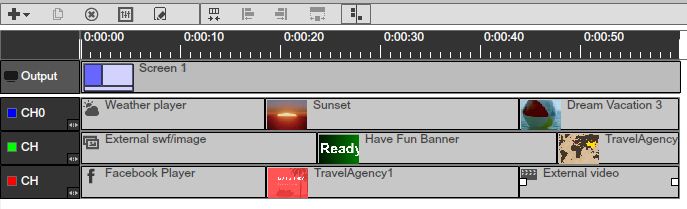
Table of Contents